Sunday, July 8, 2018

C - Unions


union is a special data type available in C that allows to store different data types in the same memory location. You can define a union with many members, but only one member can contain a value at any given time. Unions provide an efficient way of using the same memory location for multiple-purpose.

Defining a Union

To define a union, you must use the union statement in the same way as you did while defining a structure. The union statement defines a new data type with more than one member for your program. The format of the union statement is as follows −
union [union tag] {
   member definition;
   member definition;
   ...
   member definition;
} [one or more union variables];  
The union tag is optional and each member definition is a normal variable definition, such as int i; or float f; or any other valid variable definition. At the end of the union's definition, before the final semicolon, you can specify one or more union variables but it is optional. Here is the way you would define a union type named Data having three members i, f, and str −
union Data {
   int i;
   float f;
   char str[20];
} data;  
Now, a variable of Data type can store an integer, a floating-point number, or a string of characters. It means a single variable, i.e., same memory location, can be used to store multiple types of data. You can use any built-in or user defined data types inside a union based on your requirement.
The memory occupied by a union will be large enough to hold the largest member of the union. For example, in the above example, Data type will occupy 20 bytes of memory space because this is the maximum space which can be occupied by a character string. The following example displays the total memory size occupied by the above union −


#include <stdio.h>
#include <string.h>
 
union Data {
   int i;
   float f;
   char str[20];
};
 
int main( ) {

   union Data data;        

   printf( "Memory size occupied by data : %d\n", sizeof(data));

   return 0;
}
When the above code is compiled and executed, it produces the following result −
Memory size occupied by data : 20

Accessing Union Members

To access any member of a union, we use the member access operator (.). The member access operator is coded as a period between the union variable name and the union member that we wish to access. You would use the keyword union to define variables of union type. The following example shows how to use unions in a program −


#include <stdio.h>
#include <string.h>
 
union Data {
   int i;
   float f;
   char str[20];
};
 
int main( ) {

   union Data data;        

   data.i = 10;
   data.f = 220.5;
   strcpy( data.str, "C Programming");

   printf( "data.i : %d\n", data.i);
   printf( "data.f : %f\n", data.f);
   printf( "data.str : %s\n", data.str);

   return 0;
}
When the above code is compiled and executed, it produces the following result −
data.i : 1917853763
data.f : 4122360580327794860452759994368.000000
data.str : C Programming
Here, we can see that the values of i and f members of union got corrupted because the final value assigned to the variable has occupied the memory location and this is the reason that the value of str member is getting printed very well.
Now let's look into the same example once again where we will use one variable at a time which is the main purpose of having unions −


#include <stdio.h>
#include <string.h>
 
union Data {
   int i;
   float f;
   char str[20];
};
 
int main( ) {

   union Data data;        

   data.i = 10;
   printf( "data.i : %d\n", data.i);
   
   data.f = 220.5;
   printf( "data.f : %f\n", data.f);
   
   strcpy( data.str, "C Programming");
   printf( "data.str : %s\n", data.str);

   return 0;
}
When the above code is compiled and executed, it produces the following result −
data.i : 10
data.f : 220.500000
data.str : C Programming
Here, all the members are getting printed very well because one member is being used at a time.



C - Structures


Arrays allow to define type of variables that can hold several data items of the same kind. Similarly structure is another user defined data type available in C that allows to combine data items of different kinds.
Structures are used to represent a record. Suppose you want to keep track of your books in a library. You might want to track the following attributes about each book −
  • Title
  • Author
  • Subject
  • Book ID

Defining a Structure

To define a structure, you must use the struct statement. The struct statement defines a new data type, with more than one member. The format of the struct statement is as follows −
struct [structure tag] {

   member definition;
   member definition;
   ...
   member definition;
} [one or more structure variables];  
The structure tag is optional and each member definition is a normal variable definition, such as int i; or float f; or any other valid variable definition. At the end of the structure's definition, before the final semicolon, you can specify one or more structure variables but it is optional. Here is the way you would declare the Book structure −
struct Books {
   char  title[50];
   char  author[50];
   char  subject[100];
   int   book_id;
} book;  

Accessing Structure Members

To access any member of a structure, we use the member access operator (.). The member access operator is coded as a period between the structure variable name and the structure member that we wish to access. You would use the keyword struct to define variables of structure type. The following example shows how to use a structure in a program −

#include <stdio.h>
#include <string.h>
 
struct Books {
   char  title[50];
   char  author[50];
   char  subject[100];
   int   book_id;
};
 
int main( ) {

   struct Books Book1;        /* Declare Book1 of type Book */
   struct Books Book2;        /* Declare Book2 of type Book */
 
   /* book 1 specification */
   strcpy( Book1.title, "C Programming");
   strcpy( Book1.author, "Nuha Ali"); 
   strcpy( Book1.subject, "C Programming Tutorial");
   Book1.book_id = 6495407;

   /* book 2 specification */
   strcpy( Book2.title, "Telecom Billing");
   strcpy( Book2.author, "Zara Ali");
   strcpy( Book2.subject, "Telecom Billing Tutorial");
   Book2.book_id = 6495700;
 
   /* print Book1 info */
   printf( "Book 1 title : %s\n", Book1.title);
   printf( "Book 1 author : %s\n", Book1.author);
   printf( "Book 1 subject : %s\n", Book1.subject);
   printf( "Book 1 book_id : %d\n", Book1.book_id);

   /* print Book2 info */
   printf( "Book 2 title : %s\n", Book2.title);
   printf( "Book 2 author : %s\n", Book2.author);
   printf( "Book 2 subject : %s\n", Book2.subject);
   printf( "Book 2 book_id : %d\n", Book2.book_id);

   return 0;
}
When the above code is compiled and executed, it produces the following result −
Book 1 title : C Programming
Book 1 author : Nuha Ali
Book 1 subject : C Programming Tutorial
Book 1 book_id : 6495407
Book 2 title : Telecom Billing
Book 2 author : Zara Ali
Book 2 subject : Telecom Billing Tutorial
Book 2 book_id : 6495700

Structures as Function Arguments

You can pass a structure as a function argument in the same way as you pass any other variable or pointer.


#include <stdio.h>
#include <string.h>
 
struct Books {
   char  title[50];
   char  author[50];
   char  subject[100];
   int   book_id;
};

/* function declaration */
void printBook( struct Books book );

int main( ) {

   struct Books Book1;        /* Declare Book1 of type Book */
   struct Books Book2;        /* Declare Book2 of type Book */
 
   /* book 1 specification */
   strcpy( Book1.title, "C Programming");
   strcpy( Book1.author, "Nuha Ali"); 
   strcpy( Book1.subject, "C Programming Tutorial");
   Book1.book_id = 6495407;

   /* book 2 specification */
   strcpy( Book2.title, "Telecom Billing");
   strcpy( Book2.author, "Zara Ali");
   strcpy( Book2.subject, "Telecom Billing Tutorial");
   Book2.book_id = 6495700;
 
   /* print Book1 info */
   printBook( Book1 );

   /* Print Book2 info */
   printBook( Book2 );

   return 0;
}

void printBook( struct Books book ) {

   printf( "Book title : %s\n", book.title);
   printf( "Book author : %s\n", book.author);
   printf( "Book subject : %s\n", book.subject);
   printf( "Book book_id : %d\n", book.book_id);
}
When the above code is compiled and executed, it produces the following result −
Book title : C Programming
Book author : Nuha Ali
Book subject : C Programming Tutorial
Book book_id : 6495407
Book title : Telecom Billing
Book author : Zara Ali
Book subject : Telecom Billing Tutorial
Book book_id : 6495700

Pointers to Structures

You can define pointers to structures in the same way as you define pointer to any other variable −
struct Books *struct_pointer;
Now, you can store the address of a structure variable in the above defined pointer variable. To find the address of a structure variable, place the '&'; operator before the structure's name as follows −
struct_pointer = &Book1;
To access the members of a structure using a pointer to that structure, you must use the → operator as follows −
struct_pointer->title;
Let us re-write the above example using structure pointer.

#include <stdio.h>
#include <string.h>
 
struct Books {
   char  title[50];
   char  author[50];
   char  subject[100];
   int   book_id;
};

/* function declaration */
void printBook( struct Books *book );
int main( ) {

   struct Books Book1;        /* Declare Book1 of type Book */
   struct Books Book2;        /* Declare Book2 of type Book */
 
   /* book 1 specification */
   strcpy( Book1.title, "C Programming");
   strcpy( Book1.author, "Nuha Ali"); 
   strcpy( Book1.subject, "C Programming Tutorial");
   Book1.book_id = 6495407;

   /* book 2 specification */
   strcpy( Book2.title, "Telecom Billing");
   strcpy( Book2.author, "Zara Ali");
   strcpy( Book2.subject, "Telecom Billing Tutorial");
   Book2.book_id = 6495700;
 
   /* print Book1 info by passing address of Book1 */
   printBook( &Book1 );

   /* print Book2 info by passing address of Book2 */
   printBook( &Book2 );

   return 0;
}

void printBook( struct Books *book ) {

   printf( "Book title : %s\n", book->title);
   printf( "Book author : %s\n", book->author);
   printf( "Book subject : %s\n", book->subject);
   printf( "Book book_id : %d\n", book->book_id);
}
When the above code is compiled and executed, it produces the following result −
Book title : C Programming
Book author : Nuha Ali
Book subject : C Programming Tutorial
Book book_id : 6495407
Book title : Telecom Billing
Book author : Zara Ali
Book subject : Telecom Billing Tutorial
Book book_id : 6495700

Bit Fields

Bit Fields allow the packing of data in a structure. This is especially useful when memory or data storage is at a premium. Typical examples include −
  • Packing several objects into a machine word. e.g. 1 bit flags can be compacted.
  • Reading external file formats -- non-standard file formats could be read in, e.g., 9-bit integers.
C allows us to do this in a structure definition by putting :bit length after the variable. For example −
struct packed_struct {
   unsigned int f1:1;
   unsigned int f2:1;
   unsigned int f3:1;
   unsigned int f4:1;
   unsigned int type:4;
   unsigned int my_int:9;
} pack;
Here, the packed_struct contains 6 members: Four 1 bit flags f1..f3, a 4-bit type and a 9-bit my_int.
C automatically packs the above bit fields as compactly as possible, provided that the maximum length of the field is less than or equal to the integer word length of the computer. If this is not the case, then some compilers may allow memory overlap for the fields while others would store the next field in the next word.


Saturday, July 7, 2018

C - Strings

Strings are actually one-dimensional array of characters terminated by a null character '\0'. Thus a null-terminated string contains the characters that comprise the string followed by a null.
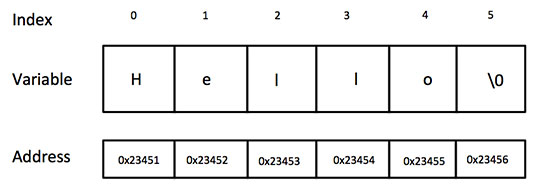
The following declaration and initialization create a string consisting of the word "Hello". To hold the null character at the end of the array, the size of the character array containing the string is one more than the number of characters in the word "Hello."
char greeting[6] = {'H', 'e', 'l', 'l', 'o', '\0'};
If you follow the rule of array initialization then you can write the above statement as follows −
char greeting[] = "Hello";
Following is the memory presentation of the above defined string in C/C++ −
String Presentation in C/C++
Actually, you do not place the null character at the end of a string constant. The C compiler automatically places the '\0' at the end of the string when it initializes the array. Let us try to print the above mentioned string −

#include <stdio.h>

int main () {

   char greeting[6] = {'H', 'e', 'l', 'l', 'o', '\0'};
   printf("Greeting message: %s\n", greeting );
   return 0;
}

When the above code is compiled and executed, it produces the following result −
Greeting message: Hello
C supports a wide range of functions that manipulate null-terminated strings −
Sr.No.Function & Purpose
1
strcpy(s1, s2);
Copies string s2 into string s1.
2
strcat(s1, s2);
Concatenates string s2 onto the end of string s1.
3
strlen(s1);
Returns the length of string s1.
4
strcmp(s1, s2);
Returns 0 if s1 and s2 are the same; less than 0 if s1<s2; greater than 0 if s1>s2.
5
strchr(s1, ch);
Returns a pointer to the first occurrence of character ch in string s1.
6
strstr(s1, s2);
Returns a pointer to the first occurrence of string s2 in string s1.
The following example uses some of the above-mentioned functions −


#include <stdio.h>
#include <string.h>

int main () {

   char str1[12] = "Hello";
   char str2[12] = "World";
   char str3[12];
   int  len ;

   /* copy str1 into str3 */
   strcpy(str3, str1);
   printf("strcpy( str3, str1) :  %s\n", str3 );

   /* concatenates str1 and str2 */
   strcat( str1, str2);
   printf("strcat( str1, str2):   %s\n", str1 );

   /* total lenghth of str1 after concatenation */
   len = strlen(str1);
   printf("strlen(str1) :  %d\n", len );

   return 0;
}

When the above code is compiled and executed, it produces the following result −
strcpy( str3, str1) :  Hello
strcat( str1, str2):   HelloWorld
strlen(str1) :  10