Saturday, July 7, 2018

C - Pointers


Pointers in C are easy and fun to learn. Some C programming tasks are performed more easily with pointers, and other tasks, such as dynamic memory allocation, cannot be performed without using pointers. So it becomes necessary to learn pointers to become a perfect C programmer. Let's start learning them in simple and easy steps.
As you know, every variable is a memory location and every memory location has its address defined which can be accessed using ampersand (&) operator, which denotes an address in memory. Consider the following example, which prints the address of the variables defined −

#include <stdio.h>

int main () {

   int  var1;
   char var2[10];

   printf("Address of var1 variable: %x\n", &var1  );
   printf("Address of var2 variable: %x\n", &var2  );

   return 0;
}


When the above code is compiled and executed, it produces the following result −
Address of var1 variable: bff5a400
Address of var2 variable: bff5a3f6

What are Pointers?

pointer is a variable whose value is the address of another variable, i.e., direct address of the memory location. Like any variable or constant, you must declare a pointer before using it to store any variable address. The general form of a pointer variable declaration is −
type *var-name;
Here, type is the pointer's base type; it must be a valid C data type and var-name is the name of the pointer variable. The asterisk * used to declare a pointer is the same asterisk used for multiplication. However, in this statement the asterisk is being used to designate a variable as a pointer. Take a look at some of the valid pointer declarations −
int    *ip;    /* pointer to an integer */
double *dp;    /* pointer to a double */
float  *fp;    /* pointer to a float */
char   *ch     /* pointer to a character */
The actual data type of the value of all pointers, whether integer, float, character, or otherwise, is the same, a long hexadecimal number that represents a memory address. The only difference between pointers of different data types is the data type of the variable or constant that the pointer points to.

How to Use Pointers?

There are a few important operations, which we will do with the help of pointers very frequently. (a) We define a pointer variable, (b) assign the address of a variable to a pointer and (c) finally access the value at the address available in the pointer variable. This is done by using unary operator * that returns the value of the variable located at the address specified by its operand. The following example makes use of these operations −


#include <stdio.h>

int main () {

   int  var = 20;   /* actual variable declaration */
   int  *ip;        /* pointer variable declaration */

   ip = &var;  /* store address of var in pointer variable*/

   printf("Address of var variable: %x\n", &var  );

   /* address stored in pointer variable */
   printf("Address stored in ip variable: %x\n", ip );

   /* access the value using the pointer */
   printf("Value of *ip variable: %d\n", *ip );

   return 0;
}


When the above code is compiled and executed, it produces the following result −
Address of var variable: bffd8b3c
Address stored in ip variable: bffd8b3c
Value of *ip variable: 20

NULL Pointers

It is always a good practice to assign a NULL value to a pointer variable in case you do not have an exact address to be assigned. This is done at the time of variable declaration. A pointer that is assigned NULL is called a null pointer.
The NULL pointer is a constant with a value of zero defined in several standard libraries. Consider the following program −


#include <stdio.h>

int main () {

   int  *ptr = NULL;

   printf("The value of ptr is : %x\n", ptr  );
 
   return 0;
}

When the above code is compiled and executed, it produces the following result −
The value of ptr is 0
In most of the operating systems, programs are not permitted to access memory at address 0 because that memory is reserved by the operating system. However, the memory address 0 has special significance; it signals that the pointer is not intended to point to an accessible memory location. But by convention, if a pointer contains the null (zero) value, it is assumed to point to nothing.
To check for a null pointer, you can use an 'if' statement as follows −
if(ptr)     /* succeeds if p is not null */
if(!ptr)    /* succeeds if p is null */

Pointers in Detail

Pointers have many but easy concepts and they are very important to C programming. The following important pointer concepts should be clear to any C programmer −
Sr.No.Concept & Description
1Pointer arithmetic
There are four arithmetic operators that can be used in pointers: ++, --, +, -
2Array of pointers
You can define arrays to hold a number of pointers.
3Pointer to pointer
C allows you to have pointer on a pointer and so on.
4Passing pointers to functions in C
Passing an argument by reference or by address enable the passed argument to be changed in the calling function by the called function.
5Return pointer from functions in C
C allows a function to return a pointer to the local variable, static variable, and dynamically allocated memory as well.


C - Arrays


Arrays a kind of data structure that can store a fixed-size sequential collection of elements of the same type. An array is used to store a collection of data, but it is often more useful to think of an array as a collection of variables of the same type.
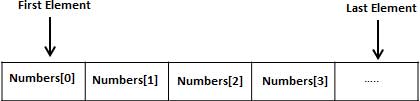
Instead of declaring individual variables, such as number0, number1, ..., and number99, you declare one array variable such as numbers and use numbers[0], numbers[1], and ..., numbers[99] to represent individual variables. A specific element in an array is accessed by an index.
All arrays consist of contiguous memory locations. The lowest address corresponds to the first element and the highest address to the last element.
Arrays in C

Declaring Arrays

To declare an array in C, a programmer specifies the type of the elements and the number of elements required by an array as follows −
type arrayName [ arraySize ];
This is called a single-dimensional array. The arraySize must be an integer constant greater than zero and type can be any valid C data type. For example, to declare a 10-element array called balance of type double, use this statement −
double balance[10];
Here balance is a variable array which is sufficient to hold up to 10 double numbers.

Initializing Arrays

You can initialize an array in C either one by one or using a single statement as follows −
double balance[5] = {1000.0, 2.0, 3.4, 7.0, 50.0};
The number of values between braces { } cannot be larger than the number of elements that we declare for the array between square brackets [ ].
If you omit the size of the array, an array just big enough to hold the initialization is created. Therefore, if you write −
double balance[] = {1000.0, 2.0, 3.4, 7.0, 50.0};
You will create exactly the same array as you did in the previous example. Following is an example to assign a single element of the array −
balance[4] = 50.0;
The above statement assigns the 5th element in the array with a value of 50.0. All arrays have 0 as the index of their first element which is also called the base index and the last index of an array will be total size of the array minus 1. Shown below is the pictorial representation of the array we discussed above −
Array Presentation

Accessing Array Elements

An element is accessed by indexing the array name. This is done by placing the index of the element within square brackets after the name of the array. For example −
double salary = balance[9];
The above statement will take the 10th element from the array and assign the value to salary variable. The following example Shows how to use all the three above mentioned concepts viz. declaration, assignment, and accessing arrays −

#include <stdio.h>
 
int main () {

   int n[ 10 ]; /* n is an array of 10 integers */
   int i,j;
 
   /* initialize elements of array n to 0 */         
   for ( i = 0; i < 10; i++ ) {
      n[ i ] = i + 100; /* set element at location i to i + 100 */
   }
   
   /* output each array element's value */
   for (j = 0; j < 10; j++ ) {
      printf("Element[%d] = %d\n", j, n[j] );
   }
 
   return 0;
}

When the above code is compiled and executed, it produces the following result −
Element[0] = 100
Element[1] = 101
Element[2] = 102
Element[3] = 103
Element[4] = 104
Element[5] = 105
Element[6] = 106
Element[7] = 107
Element[8] = 108
Element[9] = 109

Arrays in Detail

Arrays are important to C and should need a lot more attention. The following important concepts related to array should be clear to a C programmer −
Sr.No.Concept & Description
1Multi-dimensional arrays
C supports multidimensional arrays. The simplest form of the multidimensional array is the two-dimensional array.
2Passing arrays to functions
You can pass to the function a pointer to an array by specifying the array's name without an index.
3Return array from a function
C allows a function to return an array.
4Pointer to an array
You can generate a pointer to the first element of an array by simply specifying the array name, without any index.


C - Scope Rules

A scope in any programming is a region of the program where a defined variable can have its existence and beyond that variable it cannot be accessed. There are three places where variables can be declared in C programming language −
  • Inside a function or a block which is called localvariables.
  • Outside of all functions which is called global variables.
  • In the definition of function parameters which are called formal parameters.
Let us understand what are local and global variables, and formal parameters.

Local Variables

Variables that are declared inside a function or block are called local variables. They can be used only by statements that are inside that function or block of code. Local variables are not known to functions outside their own. The following example shows how local variables are used. Here all the variables a, b, and c are local to main() function.

#include <stdio.h>
 
int main () {

  /* local variable declaration */
  int a, b;
  int c;
 
  /* actual initialization */
  a = 10;
  b = 20;
  c = a + b;
 
  printf ("value of a = %d, b = %d and c = %d\n", a, b, c);
 
  return 0;
}

Global Variables

Global variables are defined outside a function, usually on top of the program. Global variables hold their values throughout the lifetime of your program and they can be accessed inside any of the functions defined for the program.
A global variable can be accessed by any function. That is, a global variable is available for use throughout your entire program after its declaration. The following program show how global variables are used in a program.


#include <stdio.h>
 
/* global variable declaration */
int g;
 
int main () {

  /* local variable declaration */
  int a, b;
 
  /* actual initialization */
  a = 10;
  b = 20;
  g = a + b;
 
  printf ("value of a = %d, b = %d and g = %d\n", a, b, g);
 
  return 0;
}

A program can have same name for local and global variables but the value of local variable inside a function will take preference. Here is an example −

#include <stdio.h>
 
/* global variable declaration */
int g = 20;
 
int main () {

  /* local variable declaration */
  int g = 10;
 
  printf ("value of g = %d\n",  g);
 
  return 0;
}

When the above code is compiled and executed, it produces the following result −


value of g = 10

Formal Parameters

Formal parameters, are treated as local variables with-in a function and they take precedence over global variables. Following is an example −


#include <stdio.h>
 
/* global variable declaration */
int a = 20;
 
int main () {

  /* local variable declaration in main function */
  int a = 10;
  int b = 20;
  int c = 0;

  printf ("value of a in main() = %d\n",  a);
  c = sum( a, b);
  printf ("value of c in main() = %d\n",  c);

  return 0;
}

/* function to add two integers */
int sum(int a, int b) {

   printf ("value of a in sum() = %d\n",  a);
   printf ("value of b in sum() = %d\n",  b);

   return a + b;
}

When the above code is compiled and executed, it produces the following result −
value of a in main() = 10
value of a in sum() = 10
value of b in sum() = 20
value of c in main() = 30

Initializing Local and Global Variables

When a local variable is defined, it is not initialized by the system, you must initialize it yourself. Global variables are initialized automatically by the system when you define them as follows −


Data TypeInitial Default Value
int0
char'\0'
float0
double0
pointerNULL
It is a good programming practice to initialize variables properly, otherwise your program may produce unexpected results, because uninitialized variables will take some garbage value already available at their memory location.


C - Scope Rules A scope in any programming is a region of the program where a defined variable can have its existence and beyond that variable it cannot be accessed. There are three places where variables can be declared in C programming language −


Inside a function or a block which is called local variables. Outside of all functions which is called global variables. In the definition of function parameters which are called formal parameters.

Let us understand what are local and global variables, and formal parameters.M/p>


Local Variables


Variables that are declared inside a function or block are called local variables. They can be used only by statements that are inside that function or block of code. Local variables are not known to functions outside their own. The following example shows how local variables are used. Here all the variables a, b, and c are local to main() function.


Friday, July 6, 2018

C programming functions


C functions is next concept in C online tutorials. Here, you will also learn about defining functions in C. Additionally there is function declaration concept. Moreover, you will know how to call a function in C. Finally you will have idea about function arguments. However, it is better that you practise C function example exercise.

What is C function?

Function in C is group of statements. These statements will perform tasks together. In addition, C programs have minimum one function. This is main(). However, programs may define other functions as well. Moreover, dividing code is easy. Because you divide code in separate functions. You must remember that function will perform only specific task.


How to define function in C?

To define function in C check following form. Moreover, you must know that C program function has different functions. This will have function header and function body.

Different parts of function

Return type

Functions may return values. Therefore, return_type is data type of value. As this returns functions. In addition, functions perform operations. Even if they do not return value. Thus, return_type is keyword void.

Function name

Function name is name of function. Furthermore, there is function signature. And it is function name with parameter list.

Parameters

You will pass value to parameter when function invokes. Here, value is actual parameter. Some people refer it as argument. Besides, parameter list is about type, order or even number of parameters of function. But some functions may not have parameters.

Function body

It has collection of statements. These will define work of function.
General form of function definition in C language
return_type function_name( parameter list ) {
body of the function
}
Example program

Define function declaration in C

Function declaration in C programming language informs compiler. Declaration tells function name. Moreover, it will tell compiler on how to call function. You may even define actual body of function separately. When you define function in one source file then you use function declaration. But remember that calling of function is in another file. Therefore, you must declare function. However, it is at top of file calling function.

How to call function in C program

Remember that when creating C function, you must define task of function. In addition, for using function, you must call it. As a result when program calls function. Program control transfers to called function.
Thus call function will perform task. You can store returned value. This will happen only if function returns value.
Program example

What is meaning of function arguments?

When function uses arguments in C programs, you must follow rules. First rule is to declare variables. These variables must accept argument’s values. Hence these variables are formal parameters of functions. Behaviour of formal parameters is similar to local variables. They create when they enter function. However, they destroy when exiting function.
There are two ways to call functions. Because it is through main function arguments in C. Keep reading to know about function arguments in C language.
Call type in functions argumentsDescription
Call by valueCall by value method will copy actual value of argument in function’s formal parameter. In addition, parameter changes will not affect function
Call by referenceCall by reference method shall copy address of function argument in C program in formal parameter. In function, you use address to access actual argument in call. Thus, parameter changes will affect argument
The default function arguments in C is call by value. This way passing function arguments in C is possible. You must remember that code in function will never change arguments. As these arguments in C will call function.


C programming Loops


Loops in C language are very important. Here, you will know C loops syntax. In addition you can practice C loops exercises. Because we gave C loops program examples here. Even you can check loops control statements in C. Finally, you will know different types of loop in C language. However, let us understand what is loop in C.

Different types of loops in C programming language

Here, C loops explained clearly. You will also know loops in C definition. For that you must know execution of statements. Remember that execution of statements happen in order. It means execution of first statement is first and so on.
In addition, programming languages have control structure. Plus, this will allow complicated execution paths.

Define loop statement

Loop statement in C will allow you to execute statement. Moreover, you can execute group of statements many times. Furthermore, you can check types of loops in C. Because these loop types help you to handle looping.
Name of loop type in CDescription
while loopwhile loop repeats statement or group of statements. It is only when condition is true. Moreover, it will test condition before execution of loop body
do while loopdo while loop tests condition. However, condition is end of loop body
for loopfor loop will execute sequence of statements many times. Additionally, it will shorten code. In this way managing loop variable is easy
nested loopsOne or more than one nested loops can be there in other loops. Therefore, you may use it in while, do while or for loops in C

Write brief description on three loop control statements in C

There are many loop control statements in C. You will also know why loop control statement used in C. Finally, these loop control statements will change execution from normal order. Automatic objects in scope destroy when execution leaves scope. Moreover, check below list. Because it has control statements which C supports.
Control statementDescription
gotogoto statement transfers control to labelled statement
continuecontinue statement will make loop to skip remainder of body. Moreover, it will retest condition before repeating
breakbreak statement in C will terminate switch or loop statement. In addition, it transfers execution to statement after loop or switch

Define infinite loop in C language

Infinite loop in C is when condition will never become false. Moreover, we use for loop for infinite loop. Finally to terminate infinite loop. You may press Ctrl + C keys.